Skip to content
Order Deck

Point of sale for cafés and restaurants

Run the counter. Keep the kitchen moving.

Order Deck is an iPad register and iPhone admin app built for busy service: fast order entry, kitchen tickets that print, and sales you can check from anywhere. It keeps working when the internet doesn't.

GST built inBuilt for Star and Epson printersiPad and iPhone

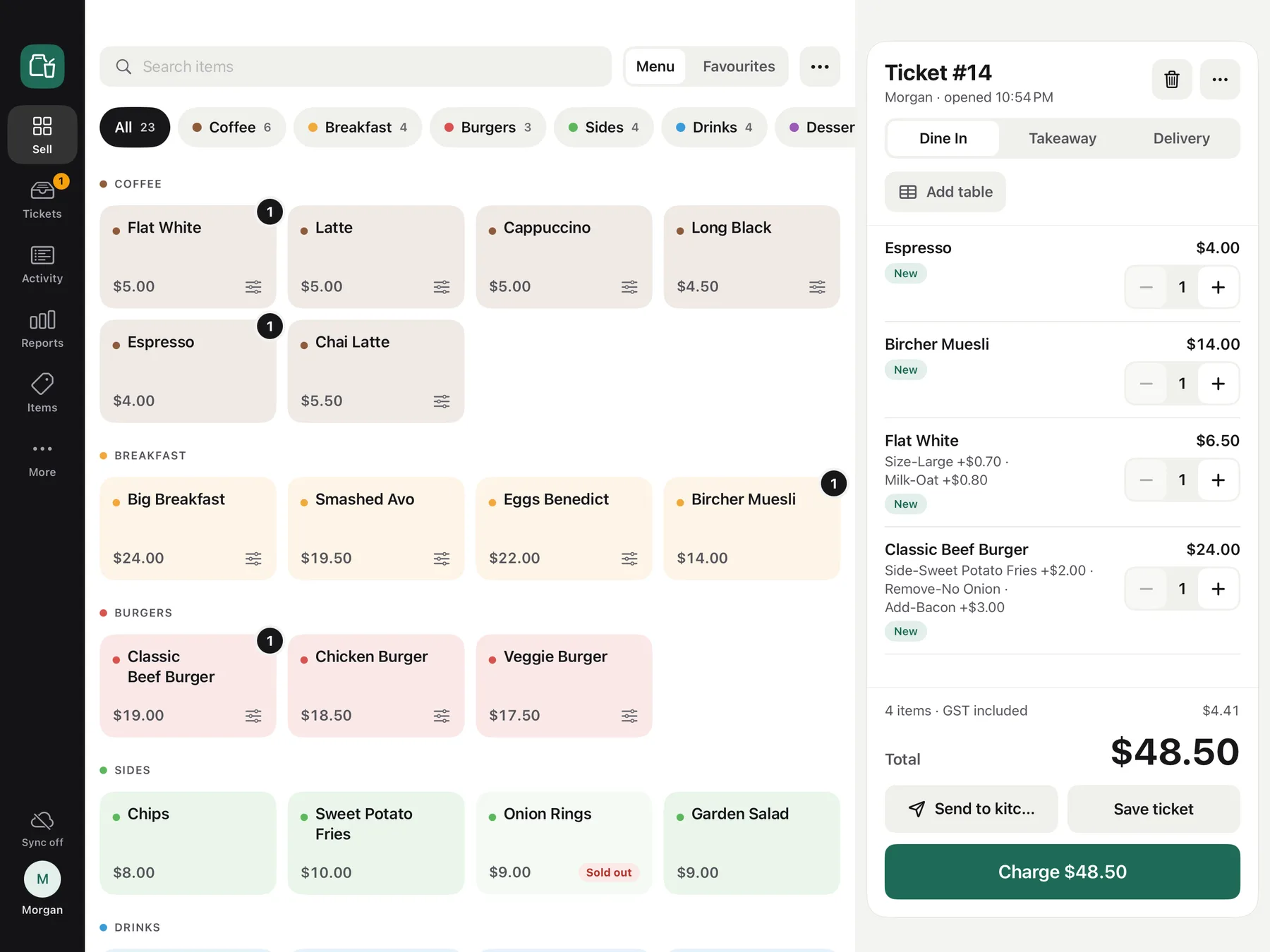
Order Deck on iPad: the menu grid beside the current sale
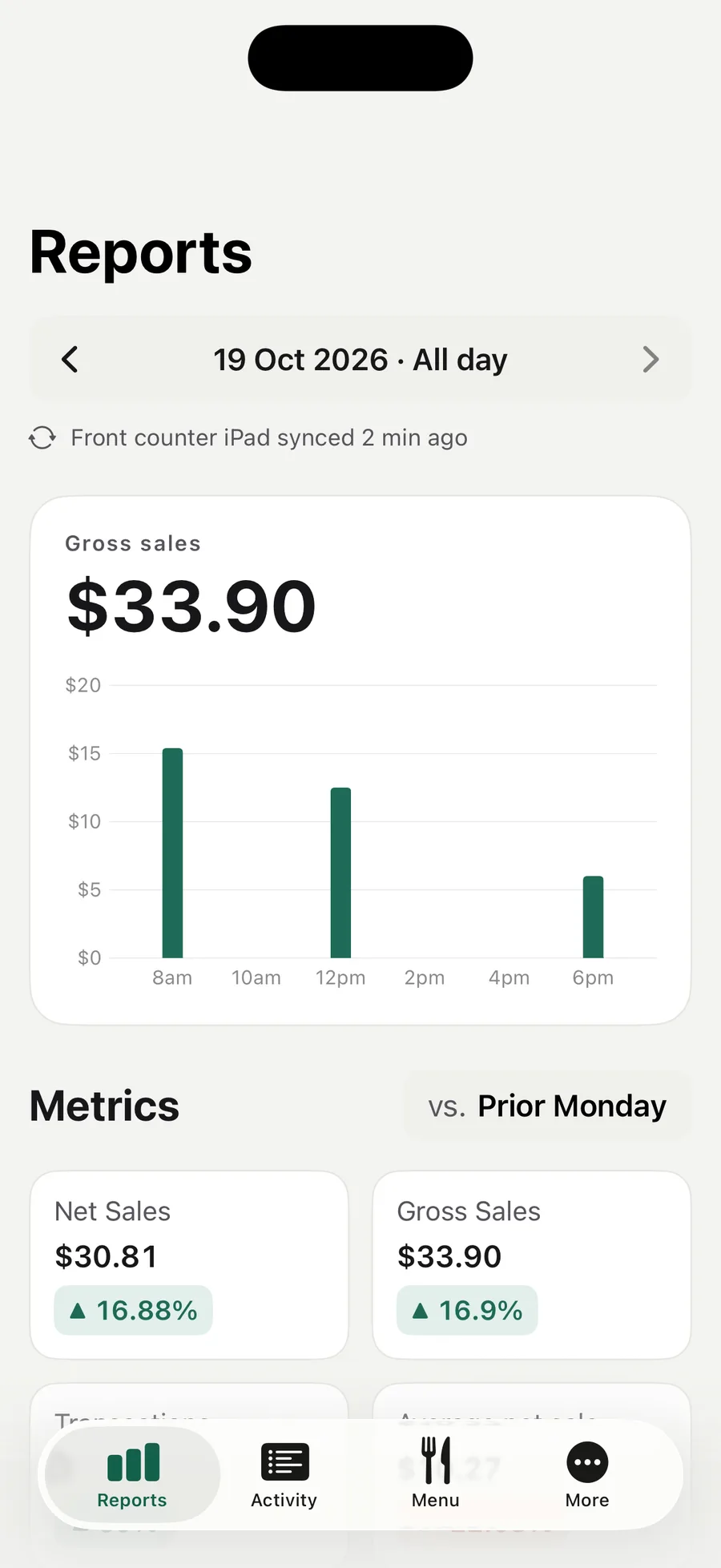
Order Deck Admin on iPhone showing today's sales report

At a glance

Works offline

Orders, payments and printing carry on without the internet. Everything syncs when you're back online.

Prints where you need it

Built for Star and Epson thermal printers, for kitchen tickets and receipts.

GST, to the cent

10% GST included and calculated once per order.

Every iPad, one restaurant

Menu, staff and settings shared across your registers; every sale reaches Order Deck Admin.

Order entry

Take orders as fast as you can talk.

Your menu sits in a clear grid. Tap an item, pick its options, mark it dine in or takeaway and send it. The ticket prints in the kitchen straight away.

  • Menu grid with photos, categories and favourites
  • Modifiers with rules, like one milk choice or extra shots
  • Park a ticket and pick it up again when the table is ready
SellTicketsActivityReportsItemsMore
Sync offMMorgan
Search itemsMenuFavourites
All21Coffee6Breakfast4Burgers3Sides4Drinks4

Coffee

Flat White$5.00
1
Latte$5.00
Cappuccino$5.00
Long Black$4.50
1
Espresso$4.00
Chai Latte$5.50

Breakfast

Big Breakfast$24.00
Smashed Avo$19.50
1
Eggs Benedict$22.00
Bircher Muesli$14.00

Burgers

Classic Beef Burger$19.00
Chicken Burger$18.50
Veggie Burger$17.50

Sides

Chips$8.00
Sweet Potato Fries$10.00
Onion Rings$9.00Sold out
Garden Salad$9.00

Ticket #14

Morgan · opened 9:41 AM

Dine InTakeawayDelivery
Add table

Flat White

Milk-Oat +$0.80

NewSent
$5.801

Smashed Avo

NewSent
$19.501

Long Black

NewSent
$4.501

3 items · GST included$2.71

Total$29.80

Send to kitchenSave ticket
Charge $29.80
Sent to kitchen
KITCHEN9:41 AM
Ticket #14 · Dine In
1 × Flat White
  – Milk-Oat
1 × Smashed Avo
1 × Long Black
Checkout

Checkout in a couple of taps.

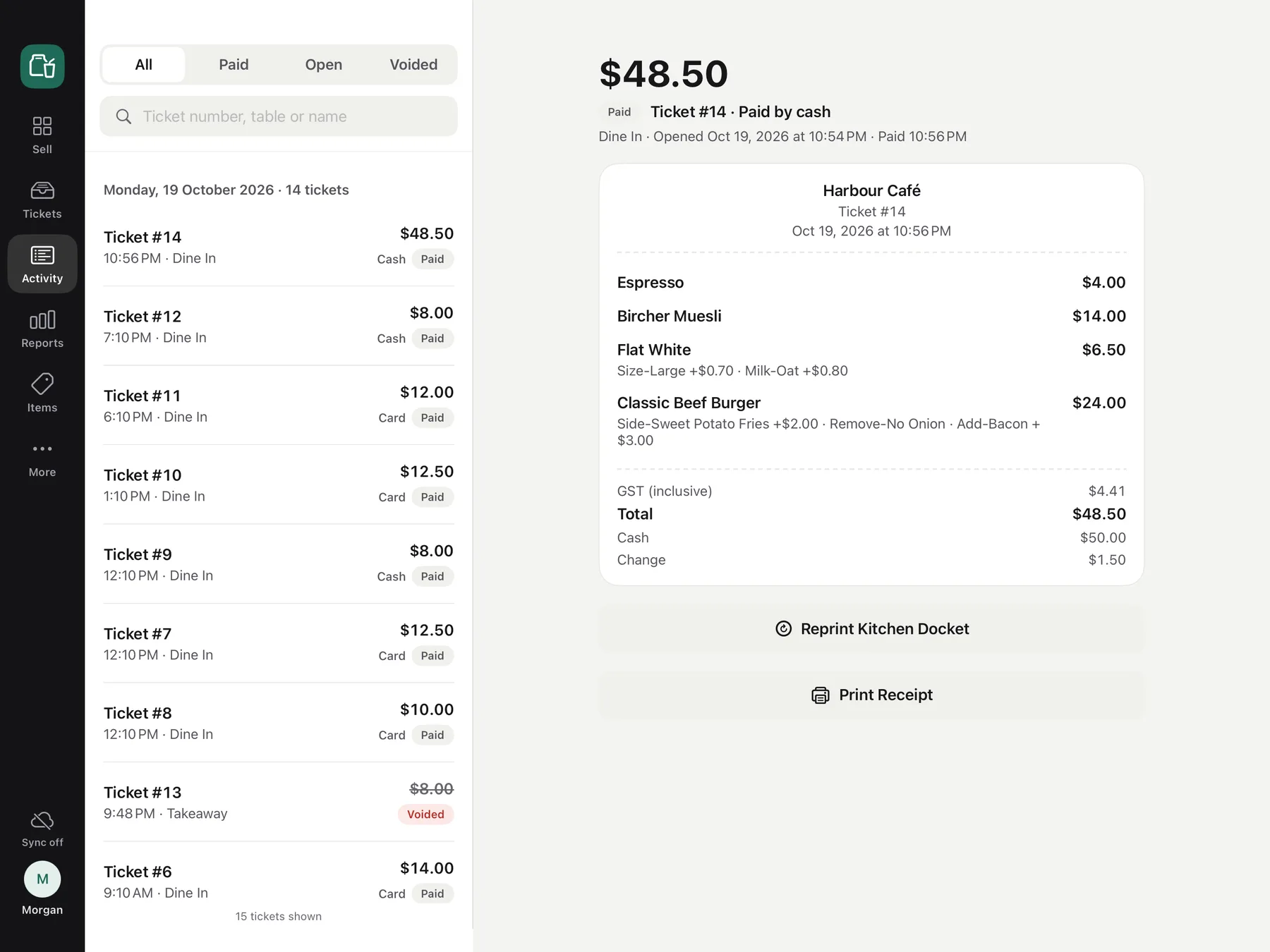
Choose cash or card and confirm. Order Deck works out the change, records card payments, and prints a receipt only when the customer wants one.

  • Cash keypad with change due
  • Card recorded as paid, taken on the EFTPOS terminal you already have
  • Print a receipt, skip it, or reprint later from Activity

Reports

Know how today is going.

The sales dashboard shows this iPad's gross and net sales, transactions and GST for today or any period, beside the period before. Order Deck Admin adds up every register.

  • Sales by hour across the trading day
  • Top items and categories
  • Takings by payment type, with GST totals

Order Deck Admin

Your restaurant, in your pocket.

Order Deck Admin puts your reports, menu and settings on iPhone. Check sales from anywhere, change a price or mark an item sold out, and every iPad picks it up on its next sync.

  • Sales reports and transactions from every register
  • Edit items, photos, categories and modifiers
  • Sold-out switch on every item

Team

The right people, the right permissions.

Everyone signs in with their own account and a role that fits the job. Anything beyond their role, like a void, asks for a manager's approval PIN on the spot.

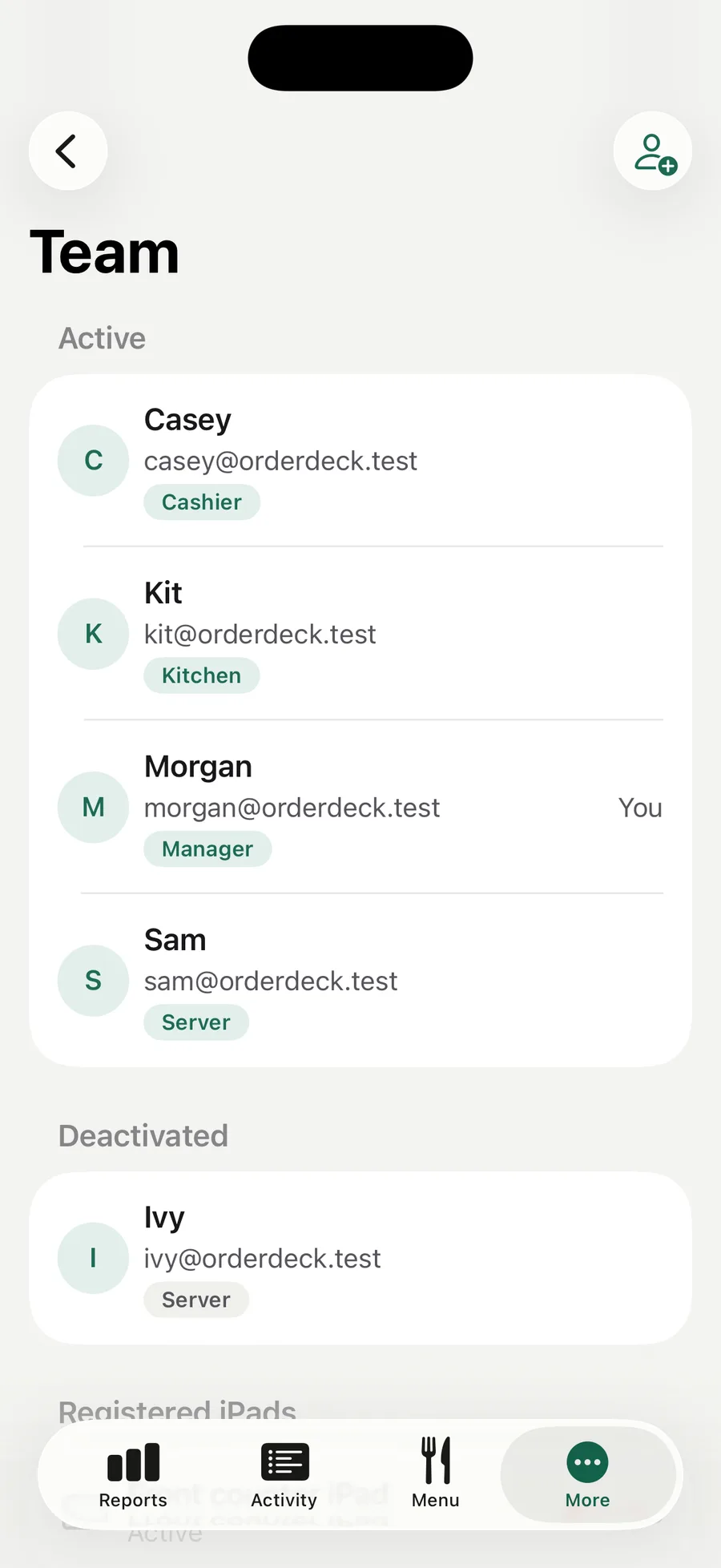
  • Manager, server, cashier and kitchen roles
  • Approval PINs for voids and other sensitive actions
  • Add staff, change roles or deactivate accounts from your phone
The Order Deck Activity screen on iPad listing the day's tickets beside a paid ticket's receipt
Order Deck Admin on iPhone showing the team list with each person's role

Offline first

Built for the day the Wi‑Fi drops.

Order Deck runs on the iPad, not in a browser tab. Service carries on through an outage, and the cloud catches up once you're back online.

Saved on the iPad first

Every order and payment is saved on the iPad as it happens, so a dropped connection never stops a sale.

Syncs in the background

When the connection comes back, sales go up to the cloud and menu changes come down, without anyone at the counter lifting a finger.

Daily backups

The iPad keeps a daily backup of its data. If the stored data is ever damaged, a manager can restore the latest backup.

Everything a busy counter needs.

  • Menu photos

    Add item photos from the iPad or your phone.

  • Modifiers

    Option sets with limits, shared across items.

  • Sold-out switch

    86 an item in a tap, on the iPad or iPhone.

  • Kitchen tickets

    Dockets print as soon as an order is sent.

  • Receipts

    Print one at checkout or reprint it later.

  • Manager approvals

    A PIN for voids and other sensitive actions.

  • Multiple iPads

    Every register shares the menu, staff and settings.

  • Transaction history

    Recent tickets from every iPad, with receipt reprints.

How it works

Up and running before the next service.

During early access we set up your Order Deck account with you. After that, it's three steps.

  1. 1

    Create your restaurant

    Sign in on the iPad with your Order Deck account and enter your restaurant's details. Then add your menu and your staff.

  2. 2

    Set up each iPad

    Sign in on another iPad and it opens your restaurant. A manager sets their approval PIN and the menu comes down from the cloud.

  3. 3

    Start taking orders

    Send tickets to the kitchen printer, take payment and watch the reports fill in, on the iPad and on your phone.

FAQ

Questions, answered.

Something else? Email support@orderdeck.app.

Does Order Deck work without the internet?
Yes. Taking orders, payments, kitchen tickets and receipts all keep working on the iPad without an internet connection. Sales sync to the cloud when the connection returns. Setting up a new iPad, Order Deck Admin and reports from other iPads need the internet.
Which devices do I need?
The register runs on iPad with iPadOS 18 or later, used in landscape. Order Deck Admin runs on iPhone with iOS 18 or later. You can use several iPads in the one restaurant.
Which printers does it support?
Order Deck is built for Star and Epson thermal receipt printers on your local network. Set each printer up for kitchen tickets or receipts. Kitchen tickets wait and print in order if a printer goes offline.
Can I take card payments?
Order Deck records card as the payment type, but it doesn't process cards itself. Keep using your existing EFTPOS terminal for the card, then record the sale as card in Order Deck.
Can I use several iPads, or several locations?
Every iPad you set up in a restaurant shares its menu, staff and settings, and Activity shows tickets from all of them. Each location is set up as its own restaurant, with its own menu, staff and sales.
Where is my data stored?
Orders are saved on the iPad first, then synced to Order Deck's cloud service so your other iPads and Order Deck Admin can see them. Each restaurant's orders and staff details are kept separate, and only that restaurant's staff and iPads can access them.
How much does it cost?
Order Deck is in early access and pricing isn't set yet. Email hello@orderdeck.app and tell us about your venue.
How do I delete my account or data?
Contact support@orderdeck.app from an address associated with your restaurant account. We will verify your request and explain what can be deleted locally, from the cloud, or from both.

Ready for your next service?

Order Deck is in early access. Create your account and set up your café or restaurant in a few minutes.